

AI Trading Bots & Automated Trading Systems — The Future of Smart Trading
Automated trading systems powered by artificial intelligence (AI) are transforming how traders operate in stocks, forex, and cryptocurrency markets. These systems can analyze massive data, generate trading signals, and execute trades automatically — all without emotion and at computer speed. Whether you want free tools, paid platforms, or to build your own AI trading bot with code, this guide gives you real steps, tools, and examples for 2026.
What Is an AI & Automated Trading System?
AI automated trading systems combine algorithmic rules, machine learning models, and predefined risk controls to:
-
Automatically analyze live market data (price, volume, indicators)
-
Generate buy/sell signals based on your strategy
-
Execute trades instantly
-
Set automatic stop loss and take profit orders
-
Improve strategies over time using AI feedback
These systems free traders from watching screens all day and handle trades 24/7.

Best AI Trading Tools for 2026 — Free & Paid Picks
H3: 📈 Free or Freemium Options
-
Pionex – Built-In Free Bots
Offers 16 automated bots (Grid, Arbitrage, Infinity Grid) with AI-suggested parameters — no coding required. -
Cryptohopper (Freemium)
AI-driven strategy optimizer with freemium tier to get started for free; paid plans unlock advanced features. -
WunderTrading
Statistical and strategy bots (including DCA and arbitrage) with a powerful free tier.
💎 Paid or Pro Platforms
-
QuantConnect AlphaBot – AI development + cloud execution for serious traders.
-
Bitsgap – Paid platform with smart bots, grid trading, and portfolio management.
-
TradersPost – Custom bot creation with advanced dashboard options.
How AI Trading Bots Work (Overview)
-
Market Data Collection — The bot pulls real-time data through APIs.
-
Signal Generation — Uses technical rules or AI models to decide when to trade.
-
Order Execution — Sends buy/sell orders automatically.
-
Risk Management — Auto stop loss and take profit orders protect capital.
-
Monitoring & Adjustment — Continuous checks and updates based on market conditions.
Step-By-Step — Create Your Own AI Trading Bot (Free)
This section shows how to create a simple AI crypto bot using Python.
⚠️ Always start with paper trading (simulated environment) before live trading.
Step 1 — Setup Your Environment
-
Install Python 3.10+
-
Create a virtual environment
-
Install libraries:
These packages help connect to exchanges, manage data, calculate indicators, and trade.
Step 2 — Write Basic Trading Bot Code
Below is a simple example that pulls data and places orders (you must add your own strategy and API keys):
For live execution you also add stop and profit logic.
Step 3 — Include Stop-Loss & Take-Profit Logic
You can calculate stop loss and take profit based on recent price:
This ensures trades exit automatically when targets are hit.
Step 4 — Test & Deploy
-
Backtest your code on historical data (simulate performance).
-
Use paper trading with test keys.
-
Once confident, connect real money (start small).
Remember: bots do not guarantee profits — markets change and strategies must be adjusted regularly.
No-Code Alternatives (for Beginners)
If coding isn’t for you:
-
TrendSpider lets you create automated trade rules without code, using visual conditions and AI alert generation.
-
Tools like Coinrule (not shown here but common in 2026 tools) provide if/then automation with simple UI.
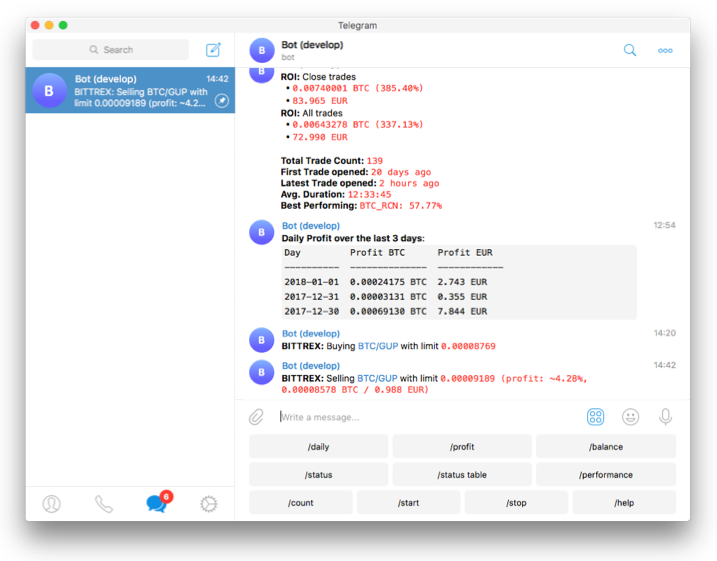
Image Steps (Visual Guide)
Here are visual steps that match key points in this article:


-
AI trading bot interface & scripts — Example Python bot dashboard.
-
Trading bot code editor UI — How code looks in action.
-
Platform dashboards for automated bot creation — Example UI of a bot tool.
-
Market data & automation display — Example trading analytics interface.
-
No-code trigger setup tools — Creating automated alerts visually.
-
Charting & signals demo — How algorithmic signals reflect on charts.
TradingView Fully Automated AI trading bots (Auto Entry + SL + TP)
This bot uses:
• EMA trend detection
• RSI momentum
• MACD confirmation
• Risk management
• Auto Stop Loss
• Auto Take Profit
• Trailing Stop
• Alert for auto-execution
Works for: Crypto, Forex, Stocks
How the System Works
H3: Logic (AI-style multi-filter system)
Bot only trades when:
LONG:
✔ EMA fast > EMA slow
✔ RSI > 55
✔ MACD bullish
SHORT:
✔ EMA fast < EMA slow
✔ RSI < 45
✔ MACD bearish
Then:
• Stop Loss = 2%
• Take Profit = 4%
• Trailing Stop = 1%
Everything automatic.
Pine Script Code (Copy → Paste in TradingView)
Open TradingView → Pine Editor → Paste → Add to chart
Step-by-Step Setup (Visual Guide)
Since you asked for image steps, here’s exactly what each screen looks like:
🖼 Step 1 – Open Pine Editor
TradingView → bottom tab → Pine Editor → paste code
🖼 Step 2 – Add to Chart
Click Add to Chart
You will see buy/sell arrows appear
🖼 Step 3 – Strategy Tester
Open Strategy Tester
See:
• profit
• win rate
• drawdown
• backtest
🖼 Step 4 – Create Alert
Right click chart → Add Alert
Choose:
Condition = Strategy → Order fills
🖼 Step 5 – Enable Webhook
Paste webhook URL from:
• Binance bot
• 3Commas
• WunderTrading
• or custom Python server
🖼 Step 6 – Fully Automated
Now:
TradingView → sends signal → exchange → trade executes automatically
No human needed ✅
🧩 Best Apps for Auto Execution
Free
• WunderTrading
• Pionex
• 3Commas free tier
Paid (Pro)
• 3Commas Pro
• Bitsgap
• Cryptohopper
These connect with TradingView alerts.
How Stop Loss & Take Profit Work Automatically
Example:
Buy at $100
Stop Loss 2% → $98
Take Profit 4% → $104
If price hits:
• $98 → auto close loss
• $104 → auto profit
• trailing → locks profit while moving up
All handled inside code automatically.
Pro Tips
Use:
• 1H or 4H timeframe
• Backtest minimum 6 months
• Risk only 5–10% capital
• Always test on paper trading first
🎯 Final Result
After setup you get:
✅ Auto signals
✅ Auto trades
✅ Auto stop loss
✅ Auto take profit
✅ Auto trailing
✅ 100% hands-free
AI Trading Software Automated Trading Strategies Best Trading Bots 2026 Cryptocurrency Trading Bots Stock Trading Algorithms Automated Trading Systems Artificial Intelligence Trading Bots Forex Trading Bots Crypto Trading Bots