Afterpay Account Setup 2026: Step-by-Step Guide with No Credit Check
How to Apply Afterpay Online is one of the most popular Buy Now, Pay Later (BNPL) platforms, allowing customers to shop instantly and pay in four interest-free installments. It is widely used in countries like New Zealand, Australia, the US, and the UK. If you want to start using Afterpay or integrate it into your shopping or business, this complete 900-word guide will walk you through the application process, requirements, and how it works step by step.
????️ What is Afterpay?
Afterpay is a digital payment service that lets you:
- Buy products immediately
- Pay later in 4 equal installments
- Avoid interest if payments are made on time
It is commonly available in fashion, electronics, beauty, and lifestyle stores both online and in physical outlets.

???? Eligibility Criteria to Apply for Afterpay
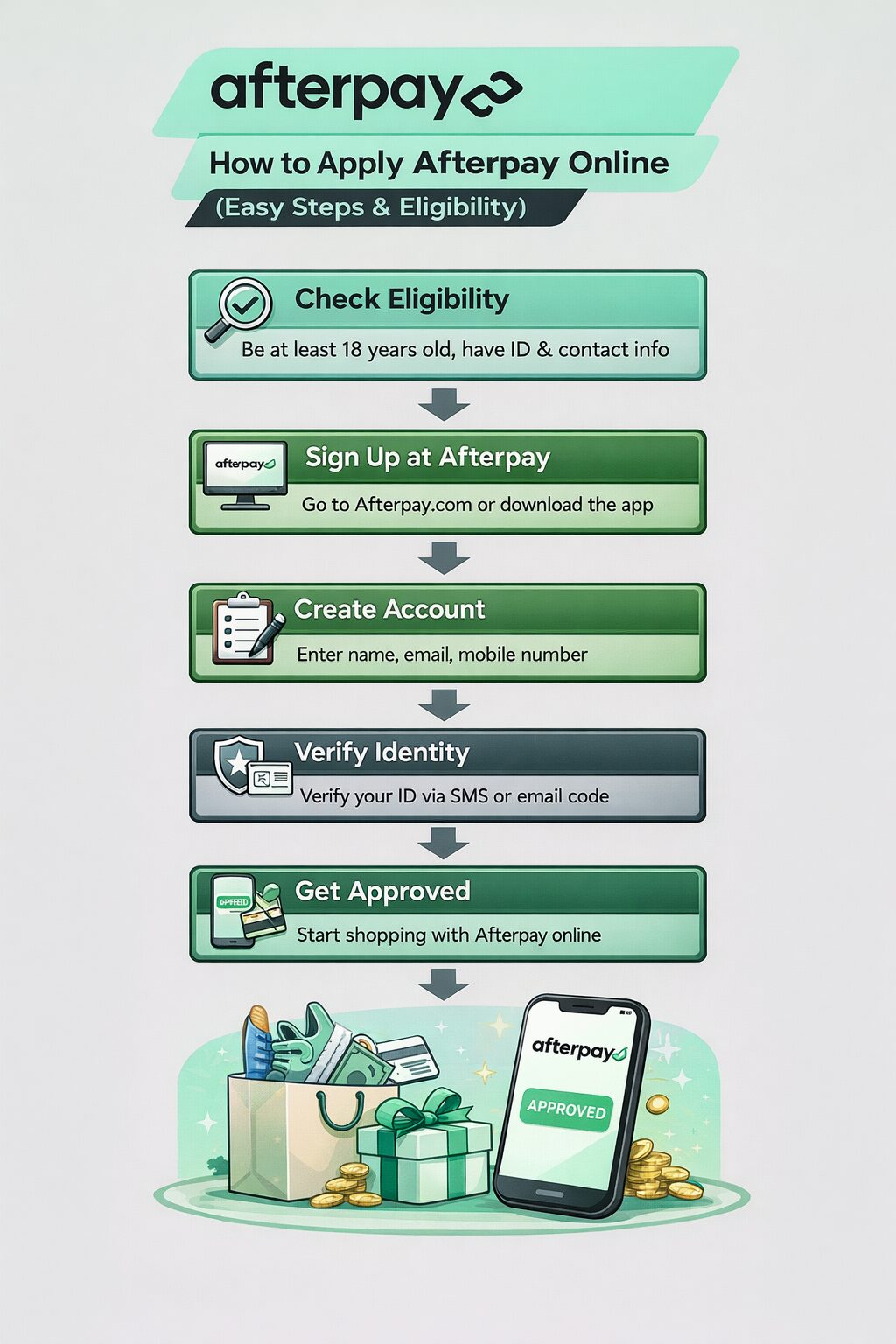
Before applying, make sure you meet these basic requirements:
- Age: 18 years or older
- Valid mobile number and email address
- Debit or credit card
- Residential address in a supported country
- Ability to meet repayment schedule
Unlike traditional credit cards, Afterpay usually does not require a hard credit check, making it easier to get approved.
???? Step-by-Step: How to Apply for Afterpay (Customer Account)
Step 1: Download the App or Visit Website
Go to the official Afterpay website or download the app from:
- Afterpay (iOS/Android)
Step 2: Sign Up for an Account
Click on “Sign Up” and enter:
- Full name
- Email address
- Mobile number
- Password
Step 3: Verify Your Identity
Afterpay will send a verification code to your phone or email. Enter the code to confirm your account.
Step 4: Add Payment Method
Link your:
- Debit card (recommended)
- Credit card
This will be used for automatic installment payments.
Step 5: Set Spending Limit
Afterpay assigns a spending limit based on your profile and payment history. New users usually start with a lower limit, which increases over time.
Step 6: Start Shopping
Browse stores that accept Afterpay and select it at checkout.
???? How Afterpay Works (Simple Explanation)
Here’s how the payment system works:
- Choose a product and select Afterpay at checkout
- Pay the first installment (25%) upfront
- Remaining balance is split into 3 equal payments
- Payments are deducted every 2 weeks
???? Example:
- Product price: $200
- First payment: $50
- Remaining: $50 every 2 weeks
???? Late Fees & Charges
Afterpay is interest-free, but late payments may result in fees:
- Late fee: $10–$25 (depending on country)
- Account restrictions if payments are missed
???? Tip: Always ensure funds are available to avoid penalties.
???? How to Use Afterpay in Stores
You can use Afterpay both online and offline:
Online:
- Select Afterpay at checkout
- Log in and confirm payment
In-store:
- Open the Afterpay app
- Generate a barcode or card
- Scan at checkout
???? How Businesses Can Apply for Afterpay
If you own a business and want to offer Afterpay:
Step 1: Visit Merchant Section
Go to Afterpay’s official website and find the merchant signup page.
Step 2: Submit Business Details
Provide:
- Business name
- Website/store details
- Industry type
- Revenue details
Step 3: Approval Process
Afterpay reviews your business for:
- Compliance
- Risk assessment
- Market fit
Step 4: Integration
Once approved, integrate Afterpay into your:
- Website (Shopify, WooCommerce, etc.)
- POS system
Step 5: Start Accepting Payments
Customers can now choose Afterpay at checkout, increasing your sales potential.
???? Benefits of Using Afterpay
For Customers:
- No interest payments
- Easy approval process
- Budget-friendly installments
For Businesses:
- Higher conversion rates
- Increased average order value
- Attract younger customers
⚠️ Risks & Considerations
- Overspending due to easy credit access
- Late fees if payments are missed
- Limited spending for new users
???? Tips to Use Afterpay Smartly
- Use only for necessary purchases
- Track your payment schedule
- Avoid multiple orders at once
- Keep funds ready for auto-payments
???? Final Thoughts (Apply Afterpay Online)
Applying for Afterpay is quick, simple, and accessible for most users. Whether you’re a shopper looking for flexible payment options or a business owner aiming to increase sales, Afterpay offers a convenient solution.
How to Apply Afterpay OnlineAfterpay apply online 2026 how to use Afterpay step by step Afterpay account setup guide 2026 Afterpay eligibility and requirements 2026 how Afterpay works simple explanation Afterpay payment plan 4 installments guide Afterpay sign up process New Zealand buy now pay later no credit check Afterpay Afterpay spending limit increase tips Afterpay late fees and rules explained how to apply Afterpay in New Zealand step by step 2026 Afterpay beginner guide with example payments is Afterpay safe and legit in 2026 Afterpay vs Klarna vs Zip comparison 2026 how to increase Afterpay limit fast