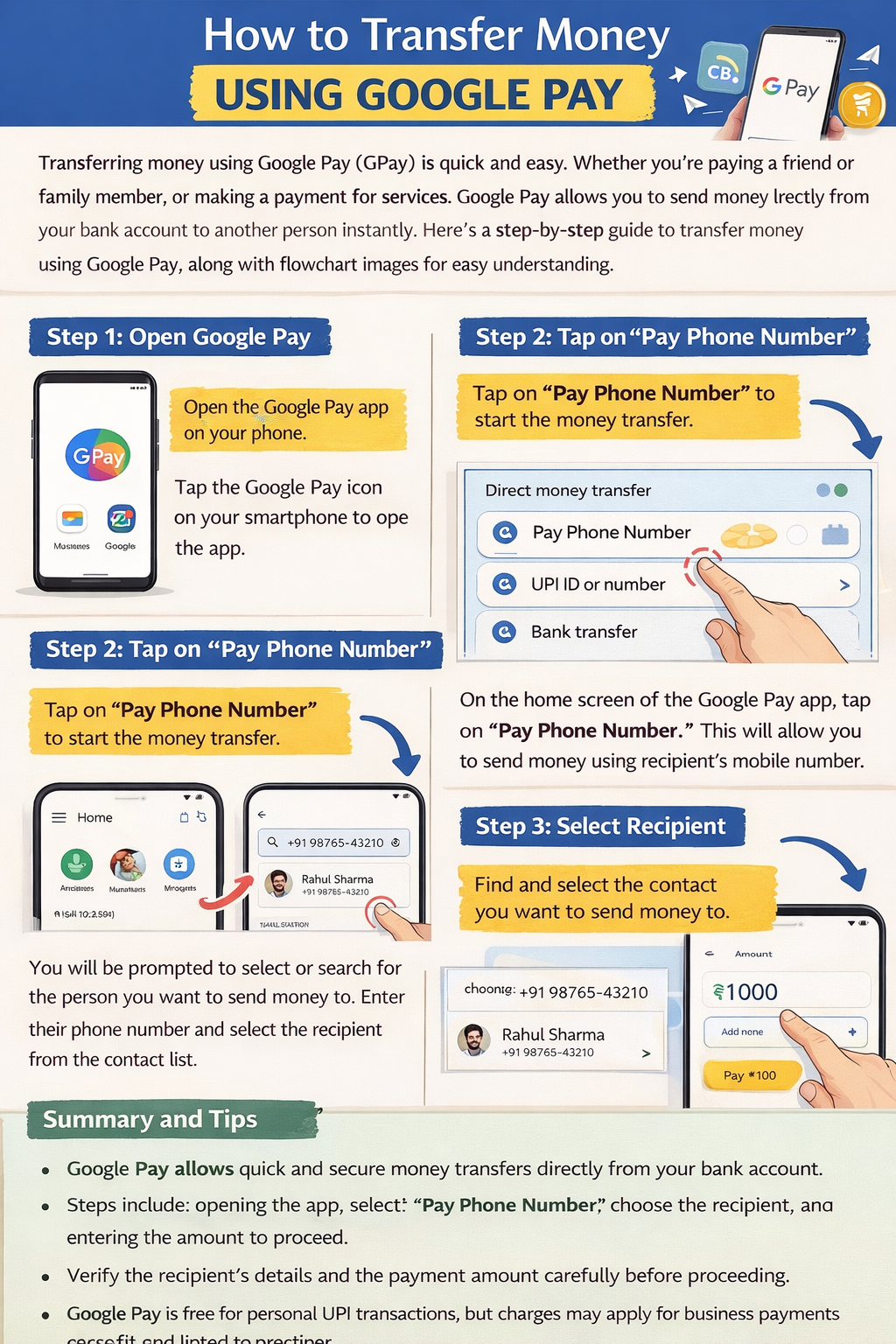
How to Transfer Money Using Google Pay – Step-by-Step Guide
Digital payments have become very popular in recent years, and Google Pay (GPay) is one of the most widely used mobile payment apps. It allows users to send and receive money instantly using the Unified Payments Interface (UPI) system. The process is fast, secure, and works 24/7 without visiting a bank.
In this guide, you will learn how to transfer money using Google Pay step by step, along with important tips, requirements, and benefits.

Step 1: Download and Install Google Pay
The first step is to install the Google Pay app on your smartphone.
Steps
- Open Google Play Store on Android or Apple App Store on iPhone.
- Search for Google Pay.
- Click Install.
- Once installed, open the app.
Requirements
- Smartphone with internet connection
- Active SIM card linked to your bank account
- A valid bank account that supports Unified Payments Interface
After installation, you can start the setup process.
Step 2: Set Up Your Google Pay Account
After installing the app, you must create and verify your account.
Steps
- Open Google Pay.
- Select your Google account or add a new one.
- Enter your mobile number linked to your bank account.
- Verify the number using OTP (One-Time Password) sent via SMS.
After verification, your Google Pay account will be activated.
Step 3: Add Your Bank Account
To send or receive money, you must connect your bank account with Google Pay.
Steps
- Open the Google Pay app.
- Tap your profile icon at the top.
- Select Bank Account.
- Tap Add Bank Account.
- Choose your bank from the list.
- The app will automatically verify your number.
Google Pay will link your bank account using Unified Payments Interface technology, allowing direct transfers between bank accounts.
Step 4: Create Your UPI PIN
A UPI PIN is required to authorize every transaction.
Steps
- Select the bank account you added.
- Tap Create UPI PIN.
- Enter the last 6 digits of your debit card and expiry date.
- Enter the OTP sent by your bank.
- Create a 4-digit or 6-digit UPI PIN.
⚠️ Keep your UPI PIN private. Never share it with anyone.
Step 5: Choose a Payment Method
Now you can transfer money using several methods available in Google Pay.
Payment Options
- Send to mobile number
- Send to UPI ID
- Send to bank account
- Scan QR code
- Pay contacts directly
Each option transfers money instantly using the Unified Payments Interface network.
Step 6: Transfer Money Using Mobile Number
This is the easiest way to send money.
Steps
- Open Google Pay.
- Tap Pay Contacts.
- Select the person from your contact list.
- Enter the amount you want to send.
- Add a note if needed.
- Tap Pay.
- Enter your UPI PIN.
The money will be transferred instantly to the receiver’s bank account.
Step 7: Transfer Money Using UPI ID
If the recipient is not in your contact list, you can send money using their UPI ID.
Steps
- Open Google Pay.
- Tap Pay UPI ID.
- Enter the receiver’s UPI ID (example: name@bank).
- Enter the amount.
- Tap Proceed to Pay.
- Enter your UPI PIN.
The payment will be completed immediately.
Step 8: Transfer Money Using QR Code
Many shops and businesses accept payments using QR codes.
Steps
- Open Google Pay.
- Tap Scan QR Code.
- Point your camera at the QR code.
- Enter the amount.
- Tap Pay.
- Enter your UPI PIN.
The payment will be completed instantly.
Step 9: Check Transaction Status
After sending money, you can check whether the transaction was successful.
Steps
- Open Google Pay.
- Tap Activity.
- View your transaction history.
You will see details like:
- Payment status
- Date and time
- Transaction ID
Benefits of Using Google Pay (Transfer Money Using Google Pay)
Using Google Pay offers many advantages.
1. Instant Money Transfer
Payments happen in seconds using Unified Payments Interface.
2. Secure Transactions
Every transaction requires a UPI PIN and bank verification.
3. 24/7 Availability
You can transfer money anytime, even on holidays.
4. No Extra Charges
Most UPI payments are free of cost.
5. Easy Bill Payments
You can also pay:
- Electricity bills
- Mobile recharge
- DTH payments
- Online shopping
Safety Tips When Using Google Pay
To keep your money safe, follow these tips:
- Never share your UPI PIN.
- Do not accept unknown payment requests.
- Use screen lock security on your phone.
- Always verify the receiver’s name before sending money.
Quick Summary
- Google Pay allows instant money transfer using Unified Payments Interface.
- You must download the app and verify your mobile number.
- Add your bank account and create a UPI PIN.
- You can transfer money using mobile number, UPI ID, QR code, or bank account.
- Payments are fast, secure, and available 24/7.
Gpay fund transfer kaise kare in Hindi Google pay money transfer step by step Using Google Pay Transfer Money gpay gpay Money Transfer How to transfer money using Google Pay Send money with Google Pay step by step Google Pay money transfer to bank account How to send money using UPI in Google Pay Instant money transfer using Google Pay