
Mastering Ubuntu Linux 2026: Your Complete Installation Handbook
पुराने समय में 512MB RAM और 5GB storage में Ubuntu चल जाता था, लेकिन 2026 के latest LTS version के लिए updated requirements इस प्रकार हैं:
Minimum Requirements:
-
Processor: 2 GHz Dual Core
-
RAM: 4GB
-
Storage: 25GB free space
-
Display: 1024×768 resolution
-
USB Drive: 8GB minimum
Recommended:
-
8GB RAM
-
SSD Storage
-
UEFI Boot Support
Ubuntu Linux 2026 Install Karne Ke Steps
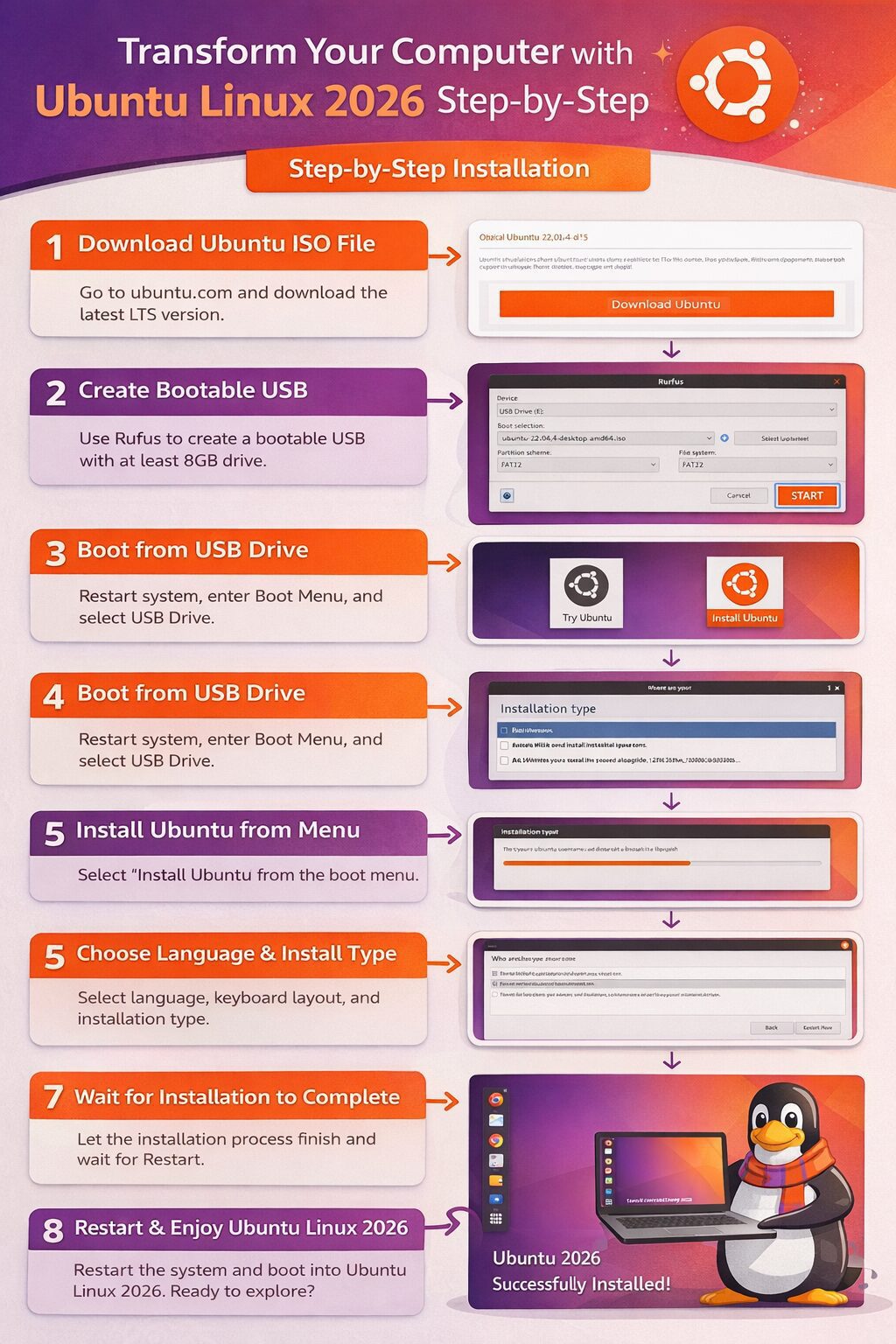
Step 1: Ubuntu ISO File Download Kare
सबसे पहले आपको Ubuntu की official website से latest ISO file download करनी होगी।
हमेशा LTS (Long Term Support) version download करें क्योंकि इसमें 5 साल तक security updates मिलते हैं।
Download करने के बाद ISO file को अपने system में safe location पर save कर लें।

Step 2: Bootable USB Create Kare
Ubuntu install करने के लिए आपको pen drive को bootable बनाना होगा।
Windows users के लिए सबसे आसान tool है Rufus।
Process:
-
8GB या उससे अधिक की pen drive insert करें
-
Rufus open करें
-
“Select” पर क्लिक करके Ubuntu ISO file चुनें
-
Partition Scheme: GPT (अगर आपका system UEFI है)
-
File System: FAT32
-
Start पर क्लिक करें
-
Yes पर क्लिक करके process complete होने दें
Bootable USB तैयार हो जाएगी।
Step 3: System Ko USB Se Boot Kare
-
Bootable USB को computer या laptop में लगाएं
-
System restart करें
-
Start होते समय F12 / F2 / ESC press करें (brand के अनुसार key अलग हो सकती है)
-
Boot Menu में USB Drive select करें
अब आपका system Ubuntu Boot Screen पर आ जाएगा।
Step 4: Install Ubuntu Option Select Kare
आपके सामने दो options आएंगे:
-
Try Ubuntu
-
Install Ubuntu
अगर आप पहले test करना चाहते हैं तो “Try Ubuntu” चुन सकते हैं।
Direct install करने के लिए “Install Ubuntu” पर क्लिक करें।
Step 5: Language Aur Keyboard Layout Select Kare
-
Language में English या अपनी पसंद की भाषा चुनें
-
Keyboard layout में English (UK) या English (US) चुनें
-
Continue पर क्लिक करें
Step 6: Updates & Other Software Page
यहाँ दो options मिलेंगे:
✔ Normal Installation
✔ Minimal Installation
अगर आपको full features चाहिए तो Normal Installation चुनें।
Third-party software और updates वाले option पर tick करें।
फिर Continue पर क्लिक करें।
Step 7: Installation Type Select Kare
यह सबसे महत्वपूर्ण step है।
Options होंगे:
-
Install Ubuntu alongside Windows
-
Erase Disk and Install Ubuntu
-
Something Else (Manual Partition)
अगर पूरा system Ubuntu में convert करना है:
“Erase Disk and Install Ubuntu” select करें।
⚠ Warning: इससे आपका पूरा data delete हो जाएगा। पहले backup जरूर लें।
Install Now पर क्लिक करें और Continue करें।
Step 8: Location & Time Zone Select Kare
Map में अपनी location select करें (India / New Zealand आदि)।
फिर Continue पर क्लिक करें।
Step 9: User Name Aur Password Create Kare
अब आपको:
-
Your Name
-
Computer Name
-
Username
-
Strong Password
enter करना होगा।
Password strong रखें और कहीं note कर लें। System login और software install करने में यही password काम आएगा।
Step 10: Installation Complete Hone Ka Wait Kare
अब installation process शुरू हो जाएगी।
यह 10–20 मिनट का समय ले सकती है (SSD में fast होगा)।
Complete होने के बाद Restart Now का option आएगा।
Restart करें और USB drive निकाल दें।
अब आपका Ubuntu Linux successfully install हो चुका है।
Ubuntu 2026 New Features
2026 में Ubuntu पहले से ज्यादा powerful और modern हो चुका है।
New Improvements:
-
Latest GNOME Desktop Interface
-
Better Secure Boot Support
-
Snap & Flatpak Support
-
Improved Software Center
-
Enhanced Privacy Controls
-
AI & Developer Tools Integration
-
Faster Boot Time
Ubuntu अब Windows और macOS का strong alternative बन चुका है।
Linux Use Karne Ke Fayde
✔ Free & Open Source
✔ Virus risk बहुत कम
✔ Fast Performance
✔ Developers के लिए best
✔ Regular Security Updates
✔ Cloud & Server Friendly
Important Safety Tips
-
Installation से पहले full data backup लें
-
Correct partition scheme (UEFI/Legacy) select करें
-
Official website से ही ISO download करें
-
8GB से कम USB use न करें
-
Stable internet connection रखें
Conclusion
Linux आज के digital world में एक powerful और secure operating system है। विशेष रूप से Ubuntu Linux beginners और professionals दोनों के लिए best choice है। ऊपर बताए गए 2026 latest steps को follow करके आप आसानी से अपने computer या laptop में Ubuntu install कर सकते हैं। अगर आपको यह जानकारी useful लगी हो तो fastnews123.com पर ऐसी ही tech related updates पढ़ते रहें। यदि आपके मन में कोई प्रश्न हो तो comment box के माध्यम से पूछ सकते हैं।
Linux installation Ubuntu system requirements best Linux OS 2026 Ubuntu new features 2026 installing Ubuntu Linux installation guide in hindi Linux installation guide Ubuntu upgrades Linux in hindi