Domicile Certificate Online Apply डोमिसाइल सर्टिफिकेट कैसे बनाएं पूरी जानकारी
Apply Domicile Certificate Online एक महत्वपूर्ण सरकारी दस्तावेज होता है, जो यह प्रमाणित करता है कि कोई व्यक्ति किसी विशेष राज्य या क्षेत्र का स्थायी निवासी है। भारत में यह सर्टिफिकेट कई सरकारी योजनाओं, नौकरी, शिक्षा और अन्य सेवाओं का लाभ लेने के लिए आवश्यक होता है। आज के डिजिटल युग में इसे ऑनलाइन बनाना पहले से कहीं अधिक आसान हो गया है। इस लेख में हम विस्तार से समझेंगे कि डोमिसाइल सर्टिफिकेट क्या है और इसे ऑनलाइन कैसे बनाएं।
डोमिसाइल सर्टिफिकेट का महत्व
डोमिसाइल सर्टिफिकेट का उपयोग कई महत्वपूर्ण कार्यों में किया जाता है। यह साबित करता है कि आप किसी राज्य के स्थायी निवासी हैं। इसके मुख्य उपयोग निम्नलिखित हैं:
- राज्य सरकार की योजनाओं का लाभ लेने के लिए
- सरकारी नौकरियों में आरक्षण पाने के लिए
- स्कूल/कॉलेज में एडमिशन के समय
- स्कॉलरशिप प्राप्त करने के लिए
- संपत्ति से जुड़े मामलों में
यह सर्टिफिकेट खासकर उन लोगों के लिए जरूरी होता है जो अपने राज्य के अंदर मिलने वाले विशेष लाभों का उपयोग करना चाहते हैं।
डोमिसाइल सर्टिफिकेट के लिए आवश्यक दस्तावेज
डोमिसाइल सर्टिफिकेट बनाने के लिए कुछ जरूरी दस्तावेजों की आवश्यकता होती है। ये दस्तावेज आपके निवास और पहचान को प्रमाणित करते हैं:
- आधार कार्ड
- वोटर आईडी कार्ड
- राशन कार्ड
- जन्म प्रमाण पत्र
- बिजली बिल या पानी का बिल
- पासपोर्ट साइज फोटो
- निवास प्रमाण (जैसे किराया एग्रीमेंट)
ध्यान रखें कि अलग-अलग राज्यों में दस्तावेजों की सूची थोड़ी अलग हो सकती है।
डोमिसाइल सर्टिफिकेट के लिए पात्रता
डोमिसाइल सर्टिफिकेट पाने के लिए कुछ शर्तें होती हैं:
- आवेदक उस राज्य का स्थायी निवासी होना चाहिए
- कुछ राज्यों में कम से कम 10–15 साल का निवास आवश्यक होता है
- नाबालिग के लिए माता-पिता का डोमिसाइल जरूरी हो सकता है
डोमिसाइल सर्टिफिकेट ऑनलाइन कैसे बनाएं
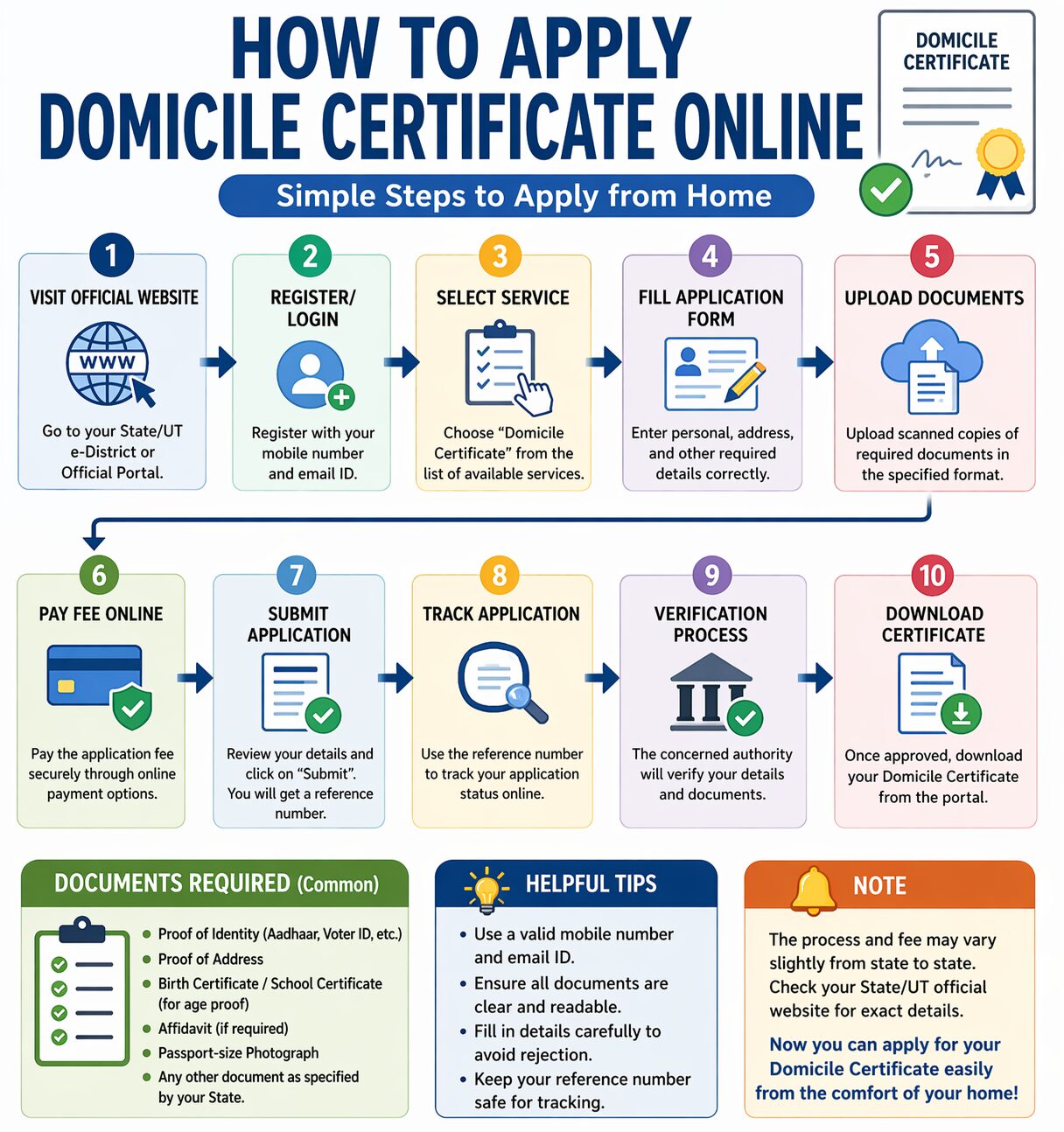
आजकल अधिकतर राज्यों ने डोमिसाइल सर्टिफिकेट के लिए ऑनलाइन सुविधा शुरू कर दी है। नीचे दिए गए स्टेप्स को फॉलो करके आप आसानी से आवेदन कर सकते हैं:
1. आधिकारिक वेबसाइट पर जाएं
सबसे पहले अपने राज्य की ई-डिस्ट्रिक्ट या सेवा पोर्टल वेबसाइट पर जाएं।
2. रजिस्ट्रेशन करें
यदि आप नए यूजर हैं, तो अपना अकाउंट बनाएं। इसके लिए मोबाइल नंबर और ईमेल आईडी की जरूरत होगी।
3. लॉगिन करें
रजिस्ट्रेशन के बाद यूजर आईडी और पासवर्ड से लॉगिन करें।
4. आवेदन फॉर्म भरें
“Domicile Certificate” या “Residence Certificate” विकल्प चुनें और फॉर्म में अपनी व्यक्तिगत जानकारी भरें।
5. दस्तावेज अपलोड करें
सभी जरूरी दस्तावेज स्कैन करके अपलोड करें।
6. शुल्क जमा करें
कुछ राज्यों में आवेदन शुल्क लिया जाता है, जिसे आप ऑनलाइन भुगतान कर सकते हैं।
7. आवेदन सबमिट करें
सभी जानकारी सही भरने के बाद फॉर्म सबमिट करें।
8. आवेदन की स्थिति जांचें
आप अपने आवेदन की स्थिति ऑनलाइन ट्रैक कर सकते हैं।
ऑफलाइन आवेदन प्रक्रिया
यदि किसी कारण से आप ऑनलाइन आवेदन नहीं कर सकते, तो ऑफलाइन भी आवेदन कर सकते हैं:
- नजदीकी तहसील या जन सेवा केंद्र जाएं
- आवेदन फॉर्म लें और भरें
- जरूरी दस्तावेज संलग्न करें
- संबंधित अधिकारी के पास जमा करें
डोमिसाइल सर्टिफिकेट बनने में कितना समय लगता है
आमतौर पर डोमिसाइल सर्टिफिकेट बनने में 7 से 15 दिन का समय लगता है। हालांकि यह राज्य और प्रक्रिया पर निर्भर करता है।
डोमिसाइल सर्टिफिकेट की वैधता
डोमिसाइल सर्टिफिकेट की वैधता राज्य के अनुसार अलग-अलग हो सकती है। कई राज्यों में यह आजीवन मान्य होता है, जबकि कुछ जगहों पर इसे अपडेट कराना पड़ सकता है।
सामान्य समस्याएं और समाधान
1. आवेदन रिजेक्ट होना:
गलत जानकारी या अधूरे दस्तावेज के कारण आवेदन रद्द हो सकता है। हमेशा सही जानकारी दें।
2. दस्तावेज अपलोड समस्या:
फाइल का सही फॉर्मेट और साइज रखें।
3. स्टेटस अपडेट न होना:
कभी-कभी वेबसाइट अपडेट में समय लगता है, थोड़ा इंतजार करें।
निष्कर्ष
डोमिसाइल सर्टिफिकेट एक जरूरी दस्तावेज है जो आपकी निवास स्थिति को प्रमाणित करता है। आज के समय में इसे ऑनलाइन बनाना बेहद आसान हो गया है। सही दस्तावेज और प्रक्रिया का पालन करके आप बिना किसी परेशानी के अपना डोमिसाइल सर्टिफिकेट प्राप्त कर सकते हैं। यह सर्टिफिकेट आपको कई सरकारी लाभों और अवसरों का दरवाजा खोलता है, इसलिए इसे बनवाना बेहद महत्वपूर्ण है।
A Domicile Certificate is an official government document that certifies that a person is a permanent resident of a particular state, region, or country. It is often required for accessing certain rights, benefits, and services that are reserved for residents of a specific area.
What is a Domicile Certificate?
A domicile certificate proves that an individual has a permanent residence in a particular location. Unlike a temporary address or current residence, “domicile” refers to the place where a person intends to live for a long time or indefinitely.
Governments issue this certificate to confirm that a person belongs to that region legally and is entitled to local privileges.
Why is a Domicile Certificate Important?
A domicile certificate is used in many situations, including:
- Education: To avail state quotas in schools, colleges, or universities
- Government Jobs: Required for jobs reserved for local residents
- Scholarships: To apply for region-specific financial aid
- Property Purchase: Sometimes needed for buying land or property
- Legal Purposes: Proof of residence in courts or official matters
- Welfare Schemes: Access to state government benefits and subsidies
In short, it acts as proof that you are a legitimate resident of a specific area.
Eligibility Criteria
Although requirements vary by region, generally you are eligible for a domicile certificate if:
- You have lived in the state/region for a specified period (often 3–15 years)
- Your parents are permanent residents of that area
- You were born in that state
- You own property or have long-term residence proof
Documents Required
To apply for a domicile certificate, you typically need:
- Proof of Identity
- Passport, national ID, or voter ID
- Proof of Residence
- Utility bills (electricity, water)
- Rental agreement or property documents
- Birth Certificate (if applicable)
- School Records
- Certificates showing you studied in that region
- Affidavit
- A sworn statement declaring your residency
- Passport-sized Photographs
Requirements may differ slightly depending on the country or state.
How to Apply for a Domicile Certificate Online
Applying online is now the most convenient method in many regions. Below is a general step-by-step guide:
Step 1: Visit the Official Government Portal
Go to your state or country’s official e-governance or citizen services website. Look for services related to “Certificates” or “Domicile Certificate.”
Step 2: Register/Login
- Create an account using your email ID or phone number
- Verify your details through OTP (One-Time Password)
- Log in to the portal
Step 3: Select “Domicile Certificate” Service
- Navigate to the list of services
- Choose Domicile Certificate Application
Step 4: Fill Out the Application Form
Provide accurate details such as:
- Full name
- Date of birth
- Address (current and permanent)
- Parent/guardian details
- Duration of stay in the region
Make sure all information matches your documents.
Step 5: Upload Required Documents
Scan and upload copies of:
- Identity proof
- Address proof
- Supporting documents (school certificates, affidavit, etc.)
Ensure files are clear and within size limits specified on the portal.
Step 6: Pay Application Fee (if applicable)
Some regions charge a small fee. You can pay using:
- Debit/credit card
- Net banking
- Mobile wallets
Step 7: Submit the Application
After reviewing all details:
- Click Submit
- Note down the application/reference number for tracking
Step 8: Verification Process
Authorities will verify your details by:
- Checking documents
- Conducting local inquiries (in some cases)
Step 9: Track Application Status
You can track progress using your reference number on the same portal.
Step 10: Download the Certificate
Once approved:
- You will receive a notification (SMS/email)
- Download the domicile certificate from the portal
Some regions also send a physical copy.
Offline Application (Alternative Method)
If online services are not available, you can apply offline:
- Visit the local government office (e.g., municipal office or district office)
- Collect the application form
- Fill it out and attach documents
- Submit to the concerned authority
- Collect the certificate after processing
Processing Time
- Typically takes 7 to 30 days, depending on the region
- Online applications are usually faster
Tips for a Successful Application
- Double-check all details before submission
- Ensure documents are valid and up to date
- Use clear, readable scans
- Keep your reference number safe
- Respond quickly if additional documents are requested
Common Reasons for Rejection
Applications may be rejected due to:
- Incomplete or incorrect information
- Invalid or unclear documents
- Insufficient proof of residence
- Mismatch between form details and documents
To avoid rejection, review everything carefully before submitting.
Conclusion (Apply Domicile Certificate Online)
A domicile certificate is an essential document that establishes your permanent residency in a specific region. It plays a crucial role in accessing education, employment, and government benefits. With digital services becoming more widespread, applying online has made the process simpler, faster, and more convenient.
Domicile Certificate Online KAISE banaye in Hindi Domicile Certificate Online banaye in Hindi Domicile Certificate क्या है Domicile Certificate Online Apply 2026 डोमिसाइल सर्टिफिकेट कैसे बनाएं Domicile Certificate Documents Required Domicile Certificate Apply Online India Residence Certificate Online Apply Domicile Certificate Status Check डोमिसाइल सर्टिफिकेट फीस और समय Domicile Certificate Download Online State Wise Domicile Certificate Process