
How to File ITR Online Step-by-Step Check Tax Amount & Refund Status
Filing your Income Tax Return (How to File ITR Online) can seem like a daunting task, especially if you are doing it for the first time. However, with the modernized e-filing portal, the process has become entirely digital, automated, and incredibly user-friendly. Whether you are a salaried employee, a freelancer, or a business owner, this comprehensive 2026 SEO guide will walk you through how to file your ITR step-by-step, from the very first login to the final verification. We will also cover exactly how to check your tax amount and how to verify your bank account to ensure your refund is credited smoothly.
Documents You Need Before You Start
Before jumping into the e-filing portal, gather these essential documents to make the process seamless:
- PAN Card and Aadhaar Card (Ensure they are linked).
- Form 16: Issued by your employer, detailing your salary and TDS (Tax Deducted at Source).
- Form 26AS & AIS (Annual Information Statement): To cross-check your tax amount, TDS, and other income sources.
- Bank Account Details: Account numbers and IFSC codes for all active bank accounts.
- Investment Proofs: Receipts for Section 80C deductions (LIC, PPF, ELSS), home loan interest, or medical insurance.

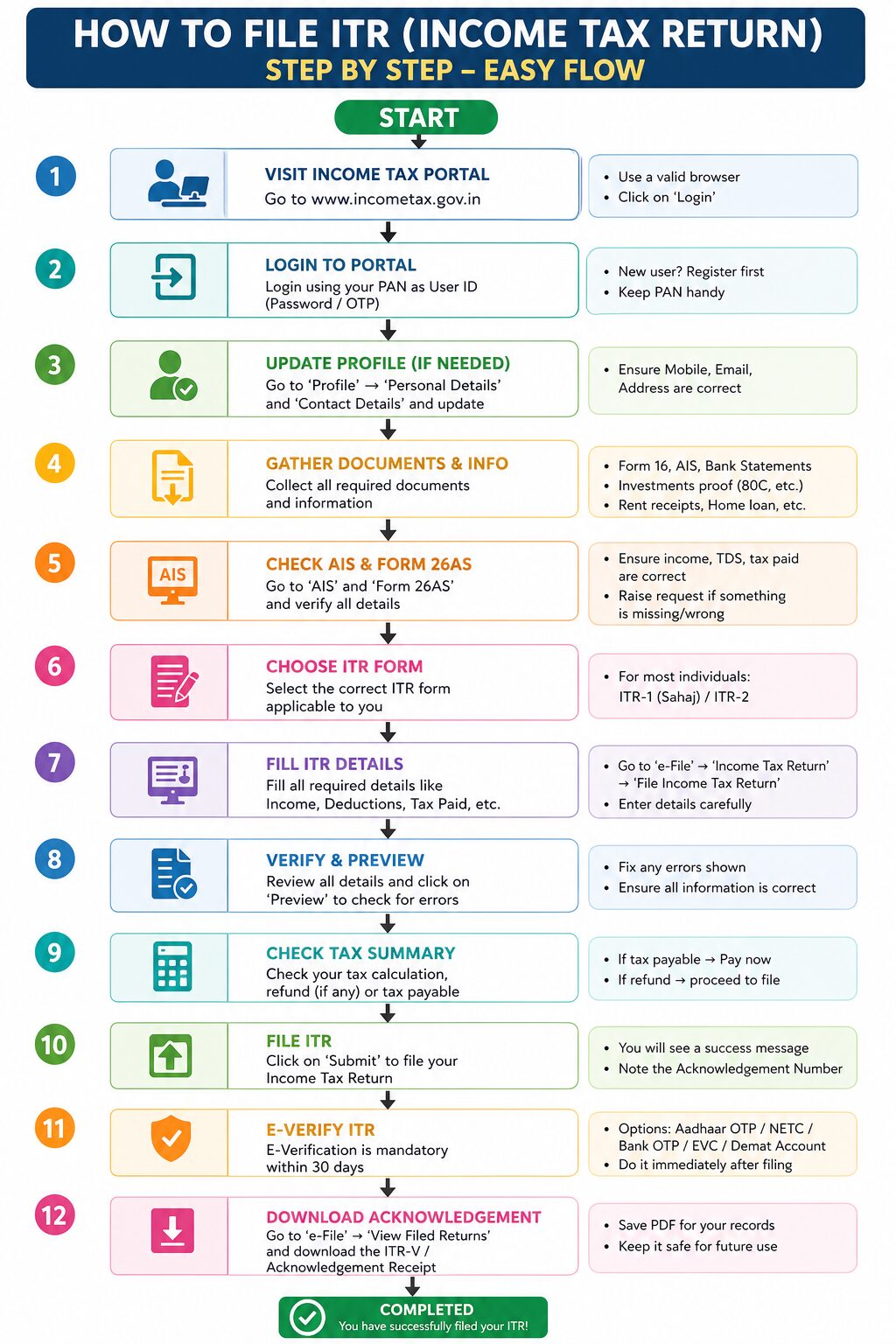
Step-by-Step Guide: How to File ITR from Start to Finish
Step 1: Log in to the Income Tax e-Filing Portal
- Visit the official Income Tax e-Filing website.
- Click on the “Login” button located at the top right corner.
- Enter your User ID (which is your PAN number), followed by your secure password.
- Confirm the secure access message to access your personalized dashboard.
Step 2: Select the Right Assessment Year and ITR Form
- On your dashboard, click on e-File > Income Tax Returns > File Income Tax Return.
- Select the correct Assessment Year (AY). (For the financial year 2025-2026, the Assessment Year is 2026-2027).
- Choose the mode of filing as “Online (Recommended)” and click Continue.
- Select your status as “Individual”.
- Choose the correct ITR Form. (If you are a salaried individual with an income up to ₹50 Lakhs, choose ITR-1).
Step 3: Validate Pre-Filled Data & Check Your Income Amount
The income tax portal automatically pre-fills most of your data using your PAN. Here is how to verify it:
- Click on “Let’s Get Started”.
- You will see several pre-filled tabs: Personal Information, Gross Total Income, Total Deductions, Tax Paid, and Total Tax Liability.
- How to check your income amount: Open the Gross Total Income tab. Compare the salary amount shown here with your Form 16. Verify your interest income from savings accounts or fixed deposits by cross-referencing it with your AIS (Annual Information Statement).
Step 4: Claim Your Deductions
- Navigate to the Total Deductions tab.
- If you opted for the Old Tax Regime, you can claim deductions under sections like 80C (investments), 80D (health insurance), and 24(b) (home loan interest).
- Verify that the pre-filled amounts match your actual investment receipts. Add any missing deductions manually.
Step 5: How to Check Your Final Tax Liability or Refund Amount
This is a crucial step where you see if you owe money to the government or if the government owes you.
- Click on the Tax Paid tab to see all the TDS deducted by your employer or banks.
- Next, click on the Total Tax Liability tab. The system will automatically compute your final tax.
- The Result: If your “Tax Paid” is more than your “Total Tax Liability,” the portal will display a green message saying, “You are eligible for a Refund of ₹[Amount].”
- If your liability is higher than the tax paid, it will show the amount you need to pay. You must pay this outstanding amount using the “e-Pay Tax” feature before submitting the form.
Step 6: How to Check and Validate Your Bank Account for Refunds
To receive your ITR refund, your bank account must be pre-validated on the tax portal. Here is how to do the “account check”:
- In the Personal Information tab, scroll down to the Bank Details section.
- Ensure you have added the correct bank account number and IFSC code.
- Look for the status next to your bank account. It must say “Validated”.
- You must also toggle the switch that says “Nominate for Refund.” If you skip this, your refund will fail to credit, even if your ITR is processed!
Step 7: Preview, Submit, and e-Verify (The Final Step)
- Once all tabs are confirmed, click on “Proceed”.
- You will be taken to a Preview page. Check the declaration box, enter your location, and review the entire form one last time.
- Click on “Proceed to Validation”. If there are no errors, you will get a “Validation Successful” message.
- e-Verification: This is mandatory. Without verification, your ITR is considered invalid. Choose “e-Verify Now”.
- The easiest way to e-Verify is via an Aadhaar OTP. Enter the OTP sent to your Aadhaar-linked mobile number and click submit.
Congratulations! You have successfully filed your ITR. ????
How to Check Your ITR Refund Status & Bank Crediting
After filing, it usually takes a few weeks for the Income Tax Department to process your return and issue the refund. Here is how you can easily track it:
Method 1: Via the e-Filing Portal
- Log in to your Income Tax e-Filing account.
- Go to e-File > Income Tax Returns > View Filed Returns.
- Locate the current Assessment Year.
- The status will show as “Processing,” “Processed,” or “Refund Issued.”
Method 2: Via the NSDL / TIN Portal
- Visit the TIN NSDL Refund Tracking website.
- Enter your PAN number and select the correct Assessment Year.
- Fill in the captcha and click submit.
- This portal will tell you the exact date your refund was dispatched and the bank account number it was credited to.
Final SEO Tips for Taxpayers in 2026 (How to File ITR Online)
Filing your ITR early not only saves you from last-minute server crashes and late fees but also ensures you get your tax refund much faster. Always remember to cross-check your amounts using the AIS (Annual Information Statement) to avoid notices from the tax department.
step by step guide to file ITR online how to file ITR online 2026 ITR 1 filing online 2026-27 how to check ITR refund status 2026 income tax return filing step by step how to check tax amount in ITR how to pre validate bank account for ITR refund e-filing ITR for salaried employees 2026 how to e-verify ITR online how to calculate income tax refund 2026 File Your ITR in 15 Minutes: Step-by-Step Online Guide 2026