
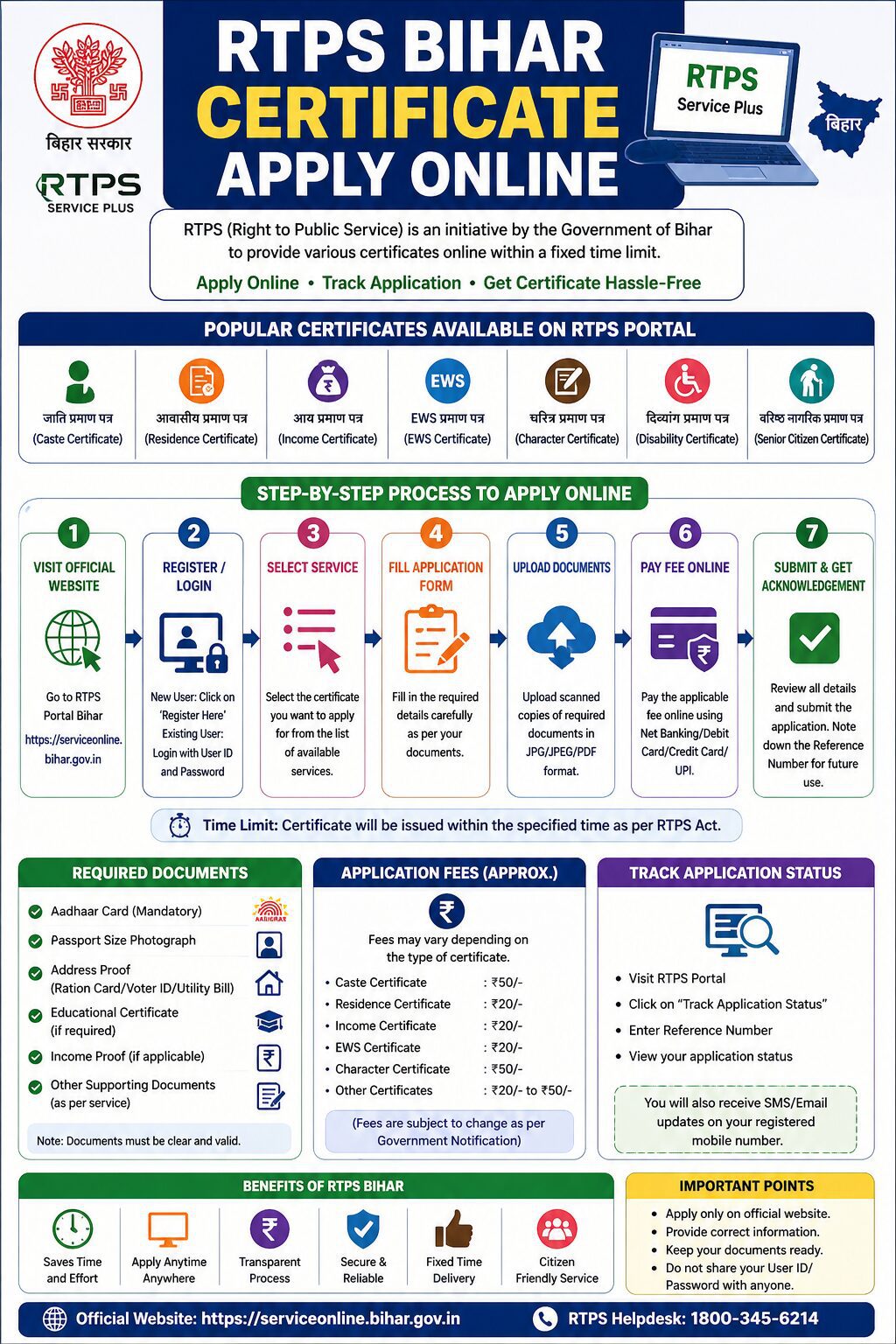
How to Apply Online RTPS Bihar Certificate Complete Step-by-Step Guide
RTPS Bihar Certificate stands for Right to Public Service Bihar. It is a government initiative by the Bihar State Government that provides citizens with essential certificates and services online through a single portal. Under the RTPS Act, citizens are legally entitled to receive government services within a fixed time limit, making the process transparent, corruption-free, and easily accessible from home.
The RTPS online portal at serviceonline.bihar.gov.in is the official one-stop platform where Bihar residents can apply for three critical certificates:
- Caste Certificate (जाति प्रमाण पत्र)
- Income Certificate (आय प्रमाण पत्र)
- Residential/Domicile Certificate (निवास प्रमाण पत्र)
These three certificates are the most important legal documents for students, job seekers, and citizens of Bihar for education, employment, and government schemes. In 2026, the Bihar government has implemented strict new document requirements to prevent fraudulent applications.

Why is RTPS Bihar Certificate Important?
| Certificate Type | Primary Purpose & Uses |
|---|---|
| Caste Certificate | Required for OBC/SC/ST reservation in education and government employment |
| Income Certificate | Needed for scholarships, EWS (Economically Weaker Section) quota, Ration Card, and welfare schemes |
| Residence Certificate | Proves permanent resident status of Bihar for local quotas and administrative purposes |
Critical Update: New Rules in 2026
The Bihar Government has implemented strict new document rules on the RTPS portal in 2026. Aadhaar card alone is no longer sufficient for certificate application. Additional supporting documents are now mandatory for all three certificates. Applications lacking these documents will be immediately rejected.
New Mandatory Documents by Certificate Type:
| Certificate | New Mandatory Document (2026) |
|---|---|
| Caste Certificate | Land deed (Khatiyan), Kewala, or any valid land document proving ancestral residence |
| Residence Certificate | Khatiyan, Ration Card, Voter ID, or Electricity/Telephone bill in parent’s or ancestor’s name |
| Income Certificate | Parent’s salary slip, Pension slip, or Income Tax Return (ITR) for the past financial year |
Complete Documents Required for RTPS Bihar Certificate Application
Universal Documents (Required for All Three Certificates):
- Aadhaar Card (mandatory for all applicants)
- Recent passport-size photograph (white background, 2×2 inches)
- Mobile number linked to Aadhaar for OTP verification
- Self-declaration affidavit form (available on the portal for download)
- Email address for application status updates
Certificate-Specific Additional Documents:
For Caste Certificate Application:
- Khatiyan (Land Record) or property deed in ancestor’s name
- Kewala certificate or land gift deed if applicable
- Father’s or grandfather’s caste certificate (if available)
- Any valid land document proving family residence and caste information
For Residence Certificate Application:
- Khatiyan (Land Record) showing ancestral residence
- Ration Card (in parent’s or ancestor’s name)
- Voter ID (in parent’s or ancestor’s name)
- Electricity or Telephone bill dated within the last 12 months in parent’s name
For Income Certificate Application:
- Parent’s or guardian’s salary slip from the past 3 months
- Pension slip (if retired)
- Income Tax Return (ITR) for the previous financial year
- Bank statements showing regular income deposits
Step-by-Step Online Application Process for RTPS Bihar Certificate
Step 1: Visit the Official RTPS Bihar Portal
Open your web browser and navigate to the official RTPS Bihar portal:
The homepage displays all available RTPS services. Before proceeding, read the “Applicant User Manual” PDF document available on the portal. This manual provides detailed instructions specific to each certificate type and helps you understand the current requirements and processing timeline.
Step 2: Register or Login to Your Account
If you are a new user, you must first create an account:
- Click “Login” at the top-right corner of the homepage
- Click “Don’t have an account? Register here” link
- Fill the registration form with:
- Full name (exactly as per Aadhaar)
- Mobile number (for OTP verification)
- Email ID (for application updates)
- Create a strong password
- Click “Submit” to receive an OTP on your registered mobile
- Enter the OTP to verify your account
- Login with your username and password
Returning users should directly login with their existing credentials.
Step 3: Select the RTPS Service Required
After logging in successfully:
- Click “Apply for Services” from the left-hand menu
- Select “View All Available Services” option
- Look for the RTPS Services section and choose your required certificate:
- For Residence/Domicile Certificate: Click under “General Administration Department”
- For Caste Certificate: Click under “Revenue and Land Reforms Department”
- For Income Certificate: Click under “Revenue and Land Reforms Department”
Step 4: Choose Application Level and Fill Details
- Select the application level:
- Block Level (for Block Development Office)
- District Level (for District Magistrate Office)
- Fill the online application form with accurate information:
- Full name (as per Aadhaar)
- Father’s name
- Mother’s name
- Date of birth
- Gender
- Complete residential address with district and pincode
- Period of continuous residence (in years and months)
- Purpose of certificate (education, employment, government scheme)
- For inherited domicile, provide parents’ or grandparents’ details
- Review all entries for accuracy before proceeding
Step 5: Upload Required Documents
Before uploading, ensure all documents are scanned properly:
- Scan documents in PDF or JPG format
- File size must not exceed 500 KB
- Ensure all text and information is clearly readable
- Poor-quality uploads lead to application rejection
Upload documents in this sequence:
- Aadhaar Card (front and back pages)
- Passport-size photograph (clear, recent, white background)
- Self-declaration affidavit (notarized or self-sworn)
- Land document (Khatiyan, property deed, or equivalent)
- Secondary proof (Ration Card, Voter ID, or utility bill)
- Any other supporting document as per certificate type
All documents marked with asterisk (*) are mandatory. Missing mandatory documents will result in automatic application rejection.
Step 6: Pay the Application Fee
RTPS Bihar certificates require payment of a nominal fee:
| Certificate Type | Processing Fee | Tatkal (Rush) Fee |
|---|---|---|
| Caste Certificate | Rs. 0 to Rs. 200 (varies by district) | Rs. 500 (5-7 days) |
| Residence Certificate | Rs. 0 to Rs. 200 (varies by district) | Rs. 500 (5-7 days) |
| Income Certificate | Rs. 0 to Rs. 200 (varies by district) | Rs. 500 (5-7 days) |
Payment options available on the portal:
- Net Banking (all major banks)
- Credit Card or Debit Card
- UPI (Unified Payments Interface)
- Digital Wallet (PayTM, Google Pay, PhonePe)
Choose your preferred payment method and complete the transaction. You will receive a payment confirmation message immediately.
Step 7: Submit Application and Receive Reference Number
After successful payment, review all entered information one final time. Click “Submit Application” button. The system will generate an:
- Application Reference Number (note this down)
- Application submission date and time
- Expected processing date
A confirmation message with your reference number will be sent to your registered mobile number and email address. Save this reference number for tracking your application status.
Step 8: Application Verification Process
After submission, your application enters the verification phase:
- Online document verification by revenue officer
- Cross-checking information with government land records
- Field verification at your residential address (if required)
- Police verification for certain certificate types
You will receive SMS and email updates at each verification stage. If any document is unclear or information is missing, the office will contact you to submit additional documents.
Step 9: Certificate Approval and Download
Once verification is complete and approved, the certificate is digitally signed and generated:
- You will receive an SMS with a download link
- The certificate is also available in your ServicePlus account
- The e-certificate can be downloaded and printed immediately
- The digitally signed certificate is valid for all government purposes
You can download the certificate from multiple sources:
- SMS download link (valid for 30 days)
- ServicePlus account inbox
- DigiLocker platform
- Official RTPS portal certificate section
Expected Processing Time for RTPS Bihar Certificates
| Application Type | Standard Processing Time | Tatkal (Urgent) Processing |
|---|---|---|
| Normal Application (all documents correct) | 10-15 working days | 5-7 working days |
| Application with field verification required | 15-30 working days | 7-10 working days |
| Application with pending document requests | 20-45 working days | 10-15 working days |
| Re-issuance of lost certificate | 5-10 working days | 2-3 working days |
Common Reasons for RTPS Application Rejection
| Rejection Reason | How to Prevent It |
|---|---|
| Incomplete personal details | Double-check spelling of name, date of birth, and address before submission |
| Missing mandatory documents | Ensure all documents marked with asterisk (*) are uploaded |
| Poor quality scanned documents | Scan at 300 DPI, ensure text is readable, avoid blurry or tilted images |
| Address mismatch across documents | Use consistent address spelling across Aadhaar, land records, and application form |
| Untranslated foreign documents | Get foreign documents officially translated and notarized |
| Expired or invalid supporting documents | Use documents within their validity period |
| Affidavit not properly notarized | Get the self-declaration affidavit notarized by a lawyer or magistrate |
| Wrong document uploaded for certificate type | Verify document requirements before uploading |
Tips for Smooth RTPS Bihar Certificate Application
- Apply at least 30-45 days before you need the certificate to allow buffer time for verification
- Keep all scanned documents organized in a single folder for quick access
- Ensure your mobile number is linked to Aadhaar and remains active during application processing
- Match spelling exactly across all documents to avoid rejection
- Track your application status regularly using the reference number
- Respond quickly to any document requests from the verification officer
- Consider Tatkal (urgent) processing if you need the certificate within a week
- Order at least 2 copies of the certificate for future use
- Save the digitally signed PDF certificate in multiple locations as backup
- Verify state-specific residence period requirements before application submission
FAQs – RTPS Bihar Certificate Online Application
1. Can I apply for RTPS Bihar certificate online without visiting the office?
Yes, the entire application process is completely online. You can apply from home using any device with internet connection. However, field verification may be required in some cases, during which a government official may visit your residence to verify your details.
2. What is the validity period of RTPS Bihar certificates?
RTPS certificates are typically valid for a lifetime. However, some certificates may require renewal after 5-10 years for specific government purposes like education or employment quotas.
3. Is the digitally signed e-certificate valid for all purposes?
Yes, the digitally signed e-certificate issued by the RTPS portal is legally valid for all government and non-government purposes including education admissions, government job applications, and visa applications.
4. Can I apply for multiple RTPS certificates simultaneously?
Yes, you can apply for Caste, Income, and Residence certificates in separate applications. However, you will need to pay separate fees and upload different documents for each certificate type.
5. What should I do if my application is rejected?
Review the rejection reason provided in the email or SMS. Correct the issues and submit a fresh application with the corrected documents. There is no additional penalty for reapplication.
6. How can I track my RTPS Bihar application status?
Login to your ServicePlus account, click “Track Application,” and enter your application reference number. You will see the current status and estimated completion date. You can also track via SMS by sending your reference number to the specified number.
7. What if I do not have a Khatiyan (land record)?
If you do not own land, you can submit alternative documents such as Ration Card, Voter ID, Electricity bill, or Telephone bill in your parent’s or ancestor’s name as proof of residence.
8. Can I get RTPS certificate if I am not a Bihar resident originally?
No, RTPS certificates are issued only to those who have lived in Bihar for the specified minimum period (usually 3-15 years depending on certificate type) and can prove continuous residence through valid documents.
9. What is the difference between regular and Tatkal processing?
Regular processing takes 10-15 working days, while Tatkal (urgent) processing takes 5-7 working days. Tatkal requires payment of an additional fee of Rs. 500 per certificate.
10. Can I download the certificate immediately after approval?
Yes, once approved, you will receive a download link via SMS. You can immediately download, print, and use the digitally signed certificate for any purpose.
RTPS Bihar Certificate Apply Online How to apply for RTPS Bihar certificate step by step RTPS Bihar caste certificate online application RTPS Bihar income certificate documents required 2026 RTPS Bihar residence certificate online process serviceonline.bihar.gov.in certificate apply RTPS Bihar certificate fees and processing time RTPS Bihar application rejection reasons RTPS Bihar Tatkal certificate 5 days RTPS Bihar certificate download DigiLocker








[…] की यदि आप एक छात्र हैं या रहते हैं, तो आप अच्छी तरह से जानते होंगे कि हमें […]
[…] because from the start, not a moment goes by without the school dropout Rahul/Rahulya (Aayush Sharma) glaring and flaring up at those who have grabbed his arrow-straight father’s (Sachin Khedekar) […]